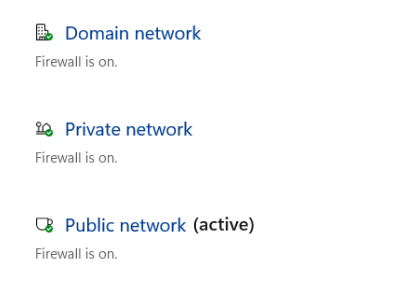
Network type set to Public instead of Domain due to Unidentified Network

Share
Network type set to Public instead of Domain due to Unidentified Network

Solution

This happens sometimes (seemingly once every few months for some of our Windows 2019 Servers). Fix by restarting Network Location Awareness service. User sessions are not interrupted when you do this. Firewall should immediately switch back to Domain.

Yay Windows!

Daily Service Reset Task

Instead of doing this manually semi-regularly, just create a task to reset the service once per day.

Create a file "C:\reset_network_awareness.ps1" and paste in this line:

 Restart-Service -name "Network Location Awareness" -force

Open Task Scheduler, right click Task Scheduler Library, and select "Create Task."
- Name: "reset Network Location Awareness service so the firewall and network adapter type remain DOMAIN"
- Use the following user account: "System"
- Check run with highest privileges
- Check hidden
- Under triggers, add a trigger to run at 6AM every day (or whenever you see fit)
- Under actions, choose "Start a program," and select the ps1 script we created at "C:\reset_network_awareness.ps1"
- Press OK

  • Wrong firewall activated (e.g. Public instead of Domain) - this will update immediately when the network type is corrected
  • Ports suddenly inaccessible due to Firewall type switching