ZFS Disk Aliases
ZFS can utilize aliases to present disks in the status listings, making it easier to identify which disks are having issues.

Steps Overview
- Determine disk paths with
zdb - Create drive alias mappings in
/etc/zfs/vdev_id.confwith those disk paths - Create new path mappings with
udevadm trigger - Re-import pool with
zpool export zpool2; zpool import -d /dev/disk/by-vdev/ zpool2
Steps
First, you need to know how ZFS refers to your disks. Re-import your pool by disk ID, if it is not already imported this way (definitely a good idea to specify either by-vdev or by-id when importing your ZFS pools, to ensure you or ZFS doesn't get confused if the /dev/sd* disk names swap around on reboot):
# export the pool if it's currently imported
>>> zpool export zpool2

# re-import by id
>>> zpool import -d /dev/disk/by-id zpool2
Then, check how ZFS refers to the disks. It could be using /dev/disk/by-id/scsi*, /dev/disk/by-id/wwn*, or some similar path. And we need to know which path structure to list in our alias file, which we can find with the zdb command:
>>> zdb
name: 'zpool2'
state: 0
txg: 3138070
pool_guid: 11973926112763345426
errata: 0
hostid: 1917237334
hostname: 'aq-zfs1'
com.delphix:has_per_vdev_zaps
vdev_children: 15
vdev_tree:
    type: 'root'
    id: 0
    guid: 11973926112763345426
    create_txg: 4
    children[0]:
        type: 'raidz'
        id: 0
        guid: 16665158957754992271
        nparity: 2
        metaslab_array: 325
        metaslab_shift: 34
        ashift: 12
        asize: 80014774108160
        is_log: 0
        create_txg: 4
        com.delphix:vdev_zap_top: 129
        children[0]:
            type: 'disk'
            id: 0
            guid: 9516741774065517930
            path: '/dev/disk/by-id/wwn-0x5000c50093d6ed33'  # here's the path we want
            vdev_enc_sysfs_path: '/sys/class/enclosure/15:0:53:0/SLOT  7 17  '
            whole_disk: 0
            DTL: 117252
            create_txg: 4
            com.delphix:vdev_zap_leaf: 130
Since ZFS is referring to our disks with the wwn* (World Wide Name) path, we will use these paths to map the the chosen alias.
To set this up, create a file at /etc/zfs/vdev_id.conf with mappings between disk IDs and the desired alias. You will also have to include aliases for any related disk partitions which show up under /dev/disk/by-id/wwn*, or ZFS may not use your alias, even if e.g. zpool status shows only /dev/disk/by-id/wwn-0x5000c50093d6f4af, making no reference to the partitions (however, you will find that zdb does reference the partition).
alias ZA16RGFC_ST8000NM0065_8TB_SAS2_7 /dev/disk/by-id/wwn-0x5000c50086b0b36f
alias ZA17DA01_ST8000NM0065_8TB_SAS2_21 /dev/disk/by-id/wwn-0x5000c50093d6f4af
alias ZA17DA01_ST8000NM0065_8TB_SAS2_21-part9 /dev/disk/by-id/wwn-0x5000c50093d6f4af-part9
alias ZA17DA01_ST8000NM0065_8TB_SAS2_21-part1 /dev/disk/by-id/wwn-0x5000c50093d6f4af-part1
alias ZA17DMYJ_ST8000NM0065_8TB_SAS4_21 /dev/disk/by-id/wwn-0x5000c50093d76377
alias ZA17DMYJ_ST8000NM0065_8TB_SAS4_21-part1 /dev/disk/by-id/wwn-0x5000c50093d76377-part1
alias ZA17DMYJ_ST8000NM0065_8TB_SAS4_21-part9 /dev/disk/by-id/wwn-0x5000c50093d76377-part9
alias ZA17E6BD_ST8000NM0065_8TB_SAS5_7 /dev/disk/by-id/wwn-0x5000c50093d920b7
alias ZA17E5RB_ST8000NM0065_8TB_SAS1_21 /dev/disk/by-id/wwn-0x5000c50093d93557
alias ZA17E5RB_ST8000NM0065_8TB_SAS1_21-part1 /dev/disk/by-id/wwn-0x5000c50093d93557-part1
alias ZA17E5RB_ST8000NM0065_8TB_SAS1_21-part9 /dev/disk/by-id/wwn-0x5000c50093d93557-part9
alias ZA17E5ZW_ST8000NM0065_8TB_SAS5_21 /dev/disk/by-id/wwn-0x5000c50093d93bd7
alias ZA17E5ZW_ST8000NM0065_8TB_SAS5_21-part1 /dev/disk/by-id/wwn-0x5000c50093d93bd7-part1
alias ZA17E5ZW_ST8000NM0065_8TB_SAS5_21-part9 /dev/disk/by-id/wwn-0x5000c50093d93bd7-part9
alias ZA17HCZW_ST8000NM0065_8TB_SAS4_7 /dev/disk/by-id/wwn-0x5000c50093e1d87b
alias ZA17HYSM_ST8000NM0065_8TB_SAS3_21 /dev/disk/by-id/wwn-0x5000c50093e272df
alias ZA17LNRG_ST8000NM0065_8TB_SAS3_7 /dev/disk/by-id/wwn-0x5000c50093e87ddf
Then, run udevadm trigger to make the kernel create new path mappings for these aliases under /dev/disk/by-vdev:
>>> udevadm trigger
>>> ls -l /dev/disk/by-vdev
lrwxrwxrwx 1 root root 11 Aug  5 12:18 ZA17DA4T_ST8000NM0065_8TB_SAS1_7 -> ../../dm-26
...
The kernel has mapped our alias to a multipath device (dm-26). But we can see that this multipath device is in fact our expected disk:
>>> ls -l /dev/disk/by-id/wwn-0x5000c50093d6ed33
lrwxrwxrwx 1 root root 11 Aug  5 12:18 /dev/disk/by-id/wwn-0x5000c50093d6ed33 -> ../../dm-26
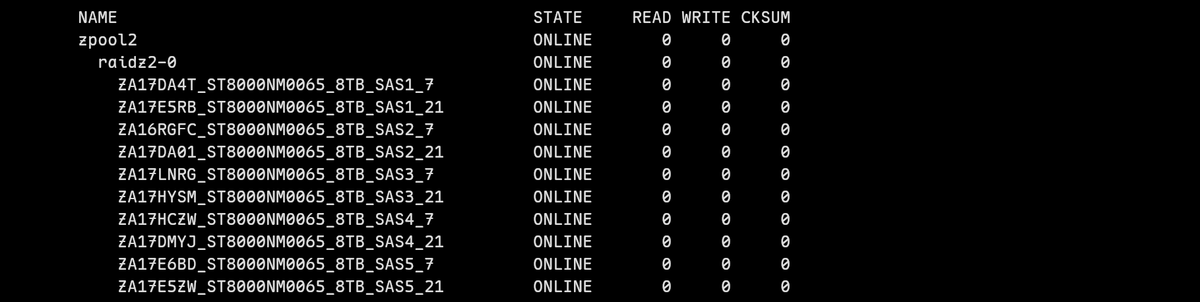
Now, if we export the pool again and re-import by-vdev, the disks will show with the aliases:
>>> zpool export zpool2
>>> zpool import -d /dev/disk/by-vdev/ zpool2
zpool status
 pool: zpool2
 state: ONLINE
config:
  NAME                                         STATE     READ WRITE CKSUM
  zpool2                                       ONLINE       0     0     0
   raidz2-0                                    ONLINE       0     0     0
     ZA17DA4T_ST8000NM0065_8TB_SAS1_7          ONLINE       0     0     0
     ZA17E5RB_ST8000NM0065_8TB_SAS1_21         ONLINE       0     0     0
     ZA16RGFC_ST8000NM0065_8TB_SAS2_7          ONLINE       0     0     0
     ZA17DA01_ST8000NM0065_8TB_SAS2_21         ONLINE       0     0     0
     ZA17LNRG_ST8000NM0065_8TB_SAS3_7          ONLINE       0     0     0
     ZA17HYSM_ST8000NM0065_8TB_SAS3_21         ONLINE       0     0     0
     ZA17HCZW_ST8000NM0065_8TB_SAS4_7          ONLINE       0     0     0
     ZA17DMYJ_ST8000NM0065_8TB_SAS4_21         ONLINE       0     0     0
     ZA17E6BD_ST8000NM0065_8TB_SAS5_7          ONLINE       0     0     0
     ZA17E5ZW_ST8000NM0065_8TB_SAS5_21         ONLINE       0     0     0
Since we're using disk IDs to form the aliases, these names will persist between exports and reboots.
Tips and Tricks
To get information about a given disk, there's a few tools you can use.
For one, zfs has a slew of built-in scripts which can help. See these with zpool status -c (can't be run as root):
>>> zpool status -c
Available 'zpool status -c' commands:
  slot            Show disk slot number as reported by the enclosure.
  cmd_to          Show SMART command timeout count (ATA).
  w_proc          Show SMART write GBytes processed over drive lifetime (SAS).
  lsblk           Show the disk size, vendor, and model number.
  pwr_cyc         Show SMART power cycle count (ATA).
  r_proc          Show SMART read GBytes processed over drive lifetime (SAS).
  iostat-1s       Do a single 1-second iostat sample and show values.
  r_ucor          Show SMART read uncorrectable errors (SAS).
  test_ended      Show when the last SMART self-test ended (if supported).
  enc             Show disk enclosure w:x:y:z value.
  vendor          Show the disk vendor.
  label           Show filesystem label.
  pend_sec        Show SMART current pending sector count (ATA).
  test_progress   Show SMART self-test percentage done.
  model           Show disk model number.
  test_status     Show SMART self-test status.
  smartx          Show SMART extended drive stats (specific to drive type).
  off_ucor        Show SMART offline uncorrectable errors (ATA).
  health          Show reported SMART status (all drives).
  defect          Show SMART grown defect list (SAS).
  serial          Show disk serial number.
  smart           Show SMART temperature and error stats (specific to drive type)
  nvme_err        Show SMART NVMe errors (NVMe).
  locate_led      Show value of the disk enclosure slot locate LED.
  test_type       Show SMART self-test type (short, long... ).
  iostat-10s      Do a single 10-second iostat sample and show values.
  iostat          Show iostat values since boot (summary page).
  rep_ucor        Show SMART reported uncorrectable count (ATA).
  smart_test      Show SMART self-test results summary.
  realloc         Show SMART reallocated sectors count (ATA).
  size            Show the disk capacity.
  temp            Show SMART drive temperature in celsius (all drives).
  upath           Show the underlying path for a device.
  ses             Show disk's enc, enc device, slot, and fault/locate LED values.
  dm-deps         Show device mapper dependent (underlying) devices.
  fault_led       Show value of the disk enclosure slot fault LED.
  media           Show whether a vdev is a file, hdd, ssd, or iscsi.
  nonmed          Show SMART non-medium errors (SAS).
  ata_err         Show SMART ATA errors (ATA).
  hours_on        Show number of hours drive powered on (all drives).
  w_ucor          Show SMART write uncorrectable errors (SAS).
  encdev          Show /dev/sg* device associated with the enclosure disk slot.
Of particular help here is likely the slot, encdev, enc, and ses commands:
>>> zpool status -c ses
...
NAME STATE     READ WRITE CKSUM   enc  encdev  slot  fault_led  locate_led
 zpool2                              ONLINE       0     0     0
  raidz2-0                           ONLINE       0     0     0
   ZA17DA4T_ST8000NM0065_8TB_SAS1_7 ONLINE 0 0 0 15:0:53:0 sg78 7 0 0
udevadm info lists out many of the paths which are associated with a disk:
>>> udevadm info /dev/disk/by-id/wwn-0x5000c50093d6ed33
P: /devices/virtual/block/dm-26
N: dm-26
L: 50
S: disk/by-id/wwn-0x5000c50093d6ed33
S: disk/by-id/dm-uuid-mpath-35000c50093d6ed33
S: disk/by-id/dm-name-mpathcf
S: mapper/mpathcf
S: disk/by-id/scsi-35000c50093d6ed33
S: disk/by-uuid/11973926112763345426
S: disk/by-vdev/ZA17DA4T_ST8000NM0065_8TB_SAS1_7
S: disk/by-label/zpool2
E: DEVPATH=/devices/virtual/block/dm-26
E: DEVNAME=/dev/dm-26
E: DEVTYPE=disk
E: DISKSEQ=590
E: MAJOR=252
E: MINOR=26
E: SUBSYSTEM=block
E: USEC_INITIALIZED=51373988
E: DM_UDEV_DISABLE_LIBRARY_FALLBACK_FLAG=1
E: DM_UDEV_PRIMARY_SOURCE_FLAG=1
E: DM_UDEV_RULES=1
E: DM_UDEV_RULES_VSN=2
E: DM_NAME=mpathcf
E: DM_UUID=mpath-35000c50093d6ed33
E: DM_SUSPENDED=0
E: MPATH_DEVICE_READY=1
E: MPATH_SBIN_PATH=/sbin
E: DM_TYPE=scsi
E: DM_WWN=0x5000c50093d6ed33
E: DM_SERIAL=35000c50093d6ed33
E: ID_FS_VERSION=5000
E: ID_FS_LABEL=zpool2
E: ID_FS_LABEL_ENC=zpool2
E: ID_FS_UUID=11973926112763345426
E: ID_FS_UUID_ENC=11973926112763345426
E: ID_FS_UUID_SUB=9516741774065517930
E: ID_FS_UUID_SUB_ENC=9516741774065517930
E: ID_FS_TYPE=zfs_member
E: ID_FS_USAGE=filesystem
E: ID_VDEV=ZA17DA4T_ST8000NM0065_8TB_SAS1_7
E: ID_VDEV_PATH=disk/by-vdev/ZA17DA4T_ST8000NM0065_8TB_SAS1_7
E: DEVLINKS=/dev/disk/by-id/wwn-0x5000c50093d6ed33 /dev/disk/by-id/dm-uuid-mpath-35000c50093d6ed33 /dev/disk/by-id/dm-name-mpathcf /dev/mapper/mpathcf /dev/disk/by-id/scsi-35000c50093d6ed33 /dev/disk/by-uuid/11973926112763345426 /dev/disk/by-vdev/ZA17DA4T_ST8000NM0065_8TB_SAS1_7 /dev/disk/by-label/zpool2
E: TAGS=:systemd:
E: CURRENT_TAGS=:systemd:
smartctl (apt install smartmontools) can provide serial numbers (as well as general drive health info):
>>> smartctl -a /dev/disk/by-id/wwn-0x5000c50093d6ed33 -d scsi
=== START OF INFORMATION SECTION ===
Vendor:               SEAGATE
Product:              ST8000NM0065
Revision:             K002
Compliance:           SPC-4
User Capacity:        8,001,563,222,016 bytes [8.00 TB]
Logical block size:   4096 bytes
LU is fully provisioned
Rotation Rate:        7200 rpm
Form Factor:          3.5 inches
Logical Unit id:      0x5000c50093d6ed33
Serial number:        ZA17DA4T0000R736B2VQ
Device type:          disk
Transport protocol:   SAS (SPL-4)
Local Time is:        Mon Aug 10 13:13:54 2026 CDT
SMART support is:     Available - device has SMART capability.
SMART support is:     Enabled
Temperature Warning:  Enabled
...
storcli can get drive enclosure and slot information:
# install storcli
>>> wget https://docs.broadcom.com/docs-and-downloads/raid-controllers/raid-controllers-common-files/007.1613.0000.0000_Unified_StorCLI.zip
>>> dpkg -i storcli_007.1613.0000.0000_all.deb

# show all drives connected to controller 0. Excerpt shows enclosure 1, slot 6 (zero-indexed) drive and serial number
>>> storcli /c0 show all
...
Drive /c0/e1/s6 Device attributes :
=================================
Manufacturer Id = SEAGATE
Model Number = ST8000NM0065
NAND Vendor = NA
SN = ZA17DA4T0000R736B2VQ
WWN = 5000C50093D6ED30
Firmware Revision = K002
Raw size = 7.277 TB [0x74702555 Sectors]
Coerced size = 7.277 TB [0x74702555 Sectors]
Non Coerced size = 7.277 TB [0x74702555 Sectors]
Device Speed = 12.0Gb/s
Link Speed = 12.0Gb/s
Sector Size = 4 KB
Config ID = NA
Number of Blocks = 1953506645
Connector Name = C3    & C3
...